In this NetApp tutorial, you’ll learn about Advanced Disk Partitioning (ADP). It’s an ONTAP feature that allows you to get more usable capacity out of your disks. Scroll down for the video and also text tutorials.
NetApp Advanced Disk Partitioning (ADP) Video Tutorial

Amir Ramjan

Neil is extremely helpful and responsive, has spent time in the industry, and has a wide range of knowledge in the storage field.
His materials cover real examples and are easy to understand, and his labs give the feel of doing it in the real live environment.
After going through this program I was able to make myself competitive in the job market. I’ve landed an awesome job within NetApp itself as a consultant. I really recommend this course.
Before Data ONTAP 8.3
You would maybe want to have just one data aggregate on an entry-level system. For example, we had an entry-level system with 12 usable disks, and we had two redundant controllers there as well, Controller1 and Controller2.
Now, we could create two data aggregates. If we did that, then Controller1 would own one, and that aggregate would have 6 disks. We would also have Controller2 owning another aggregate, also with 6 disks.
Using RAID-DP out of those two aggregates, we would require having two parity drives on each. Out of the 12 available disks, we would have four disks being used for parity.
Another way we could do it is, rather than having the two aggregates, we would just have the one aggregate, and then we would only require two parity drives rather than having four, and that would give us more usable capacity out of the system. That was kind of a simplified example, and it's actually worse than that.
For this example, it is an entry-level system with 12 internal drives. Let's say this is back before Data ONTAP 8.3 and before we had Advanced Disk Partitioning (ADP).
Let's say we've got a FAS2520 HA pair with 12 internal drives. Let's look at the makeup of how those drives are going to be allocated. It’s an HA pair, so we've got two controllers there, and even if we only use one data aggregate, we still need to have an aggregate zero (Aggr0) for both of our nodes.
The system information is stored in Aggr0, and both nodes need to have access to that. Both nodes need to have their own Aggr0.
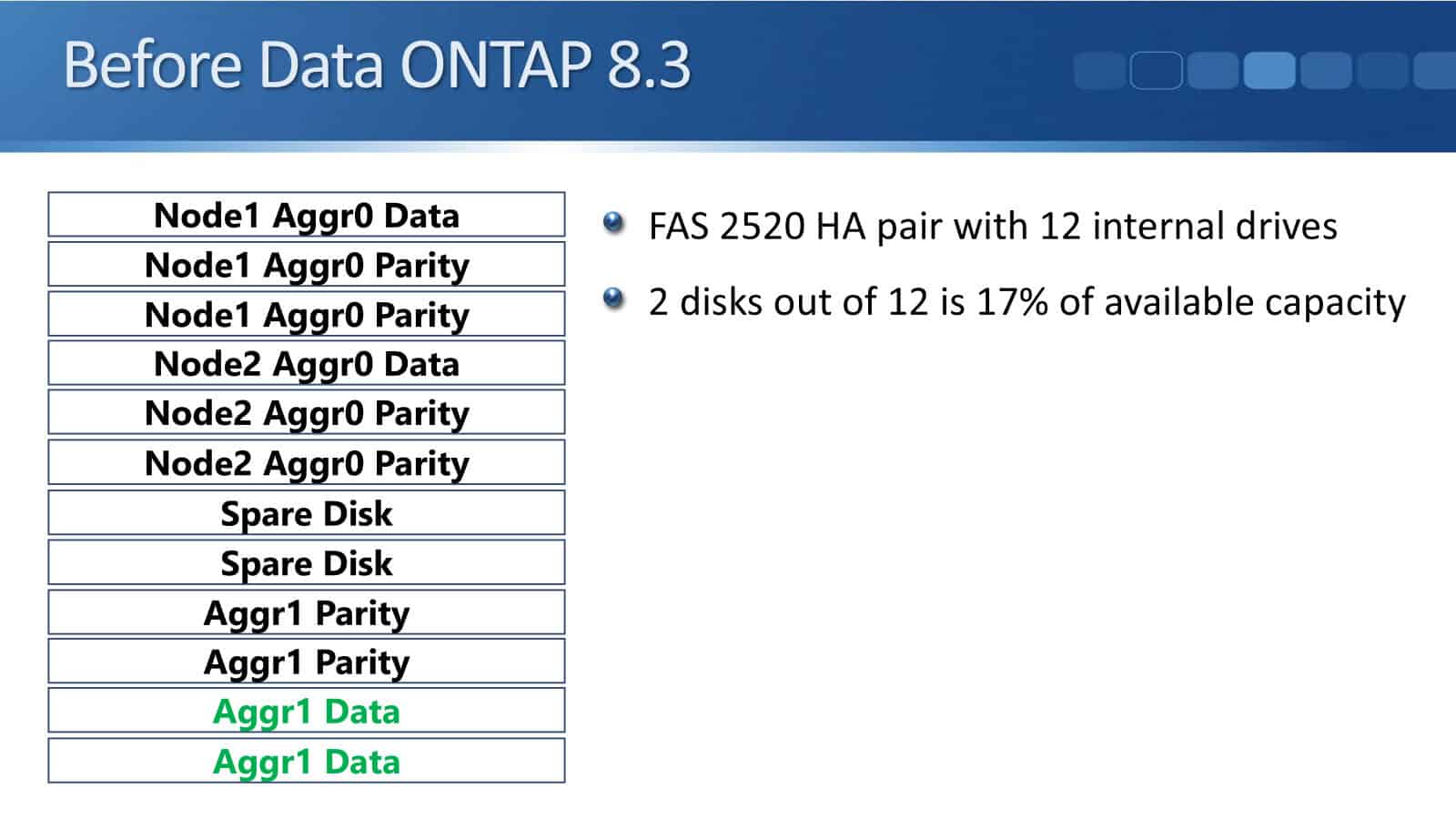
Out of those 12 drives, three drives would be used for Aggr0 for Node1. Here, we're using RAID-DP. For Aggr0, the minimum size is three disks, so we do that. Out of our 12 disks, we've already taken out three of them for Aggr0 on Node1.
We don't just have Node1, though. We also have Node2 requiring its Aggr0, so that requires another three disks. We've taken out 6 disks already out of our 12 available.
Then we also need to have spare drives. We need to have two spare disks. That's another two disks gone, so we've taken out 8 out of the 12. We can now create our data aggregate, but we're using RAID-DP, so two of the disks must be used for parity.
Out of our 12 drives, only two drives are actually going to be used for user data. Two disks out of 12—we're using 17% of the available capacity.
Out of all those disks that we bought and paid for, 10 of them are being used for running the system, and only two of them are actually going to be used for what we bought the system for, which is storing the user data.
Obviously, that is not very efficient. NetApp did realize that it was an issue, so that was why the ADP feature was developed. Let's see how things work when we're using ADP.
Root-Data Advanced Disk Partitioning
With ONTAP 8.3, the feature of Root-Data Advanced Disk Partitioning became available. What happens with ADP is the disks are partitioned, so we end up with, as you can see in the diagram below, a small partition that is the root partition, and we've got the larger-size partition right on each of the disks. That is the data partition, which is going to be used for the client data.
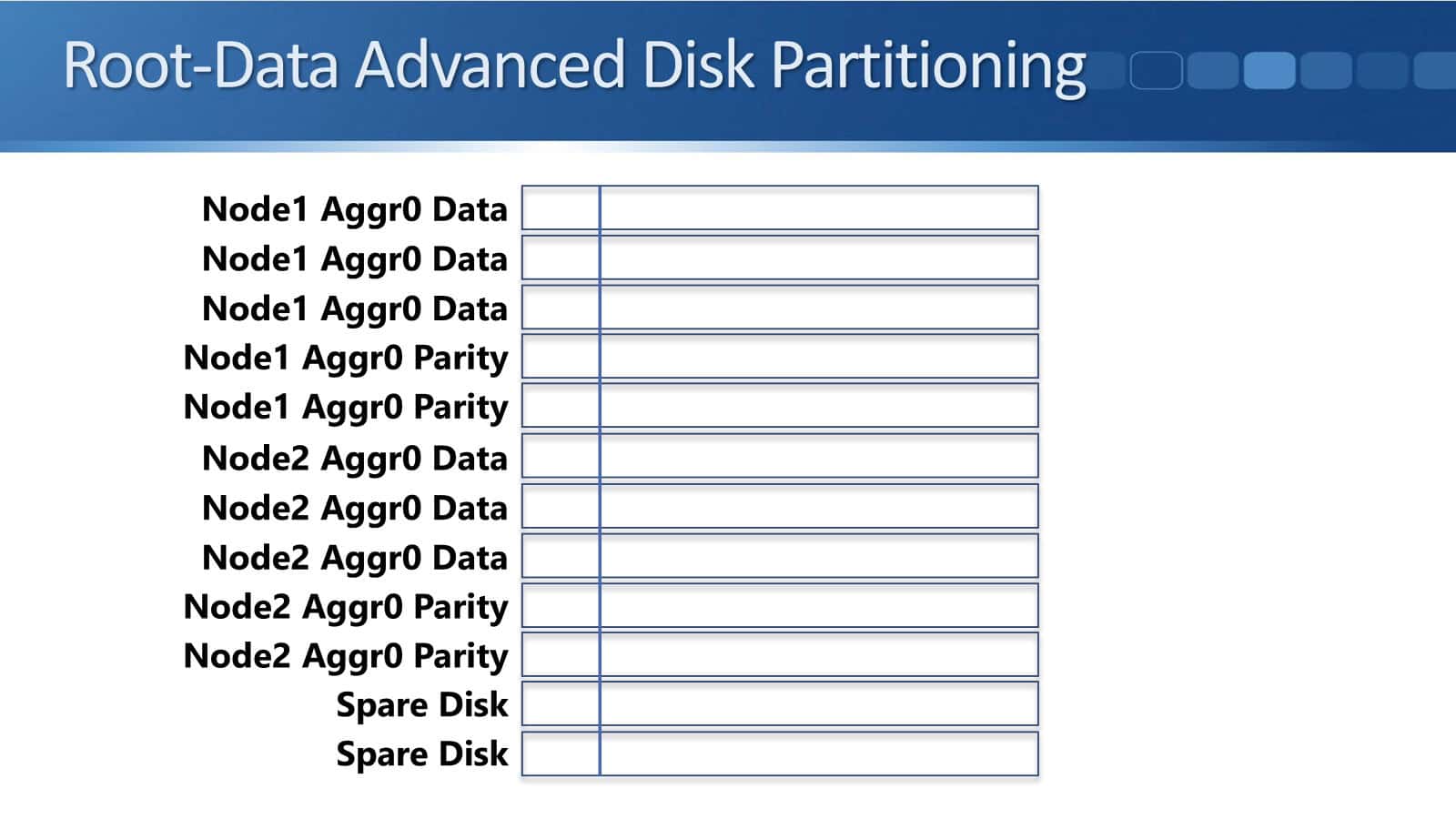
Now, the way that the space and the partitions are allocated is we still need to do the same things, but rather than using an entire disk, we can use the smaller partition for the system information.
Because the partitions are smaller, we're going to use three of the partitions for Aggr0 data for Node1, and we still need the parity information as well, so two of those small partitions are used for the parity.
Then we need to do the same for Node2, so we use three of the small partitions for its data and two of the small partitions for its parity. Then, in case we have any issues there on our Aggr0s, the last two small partitions are allocated as spares.
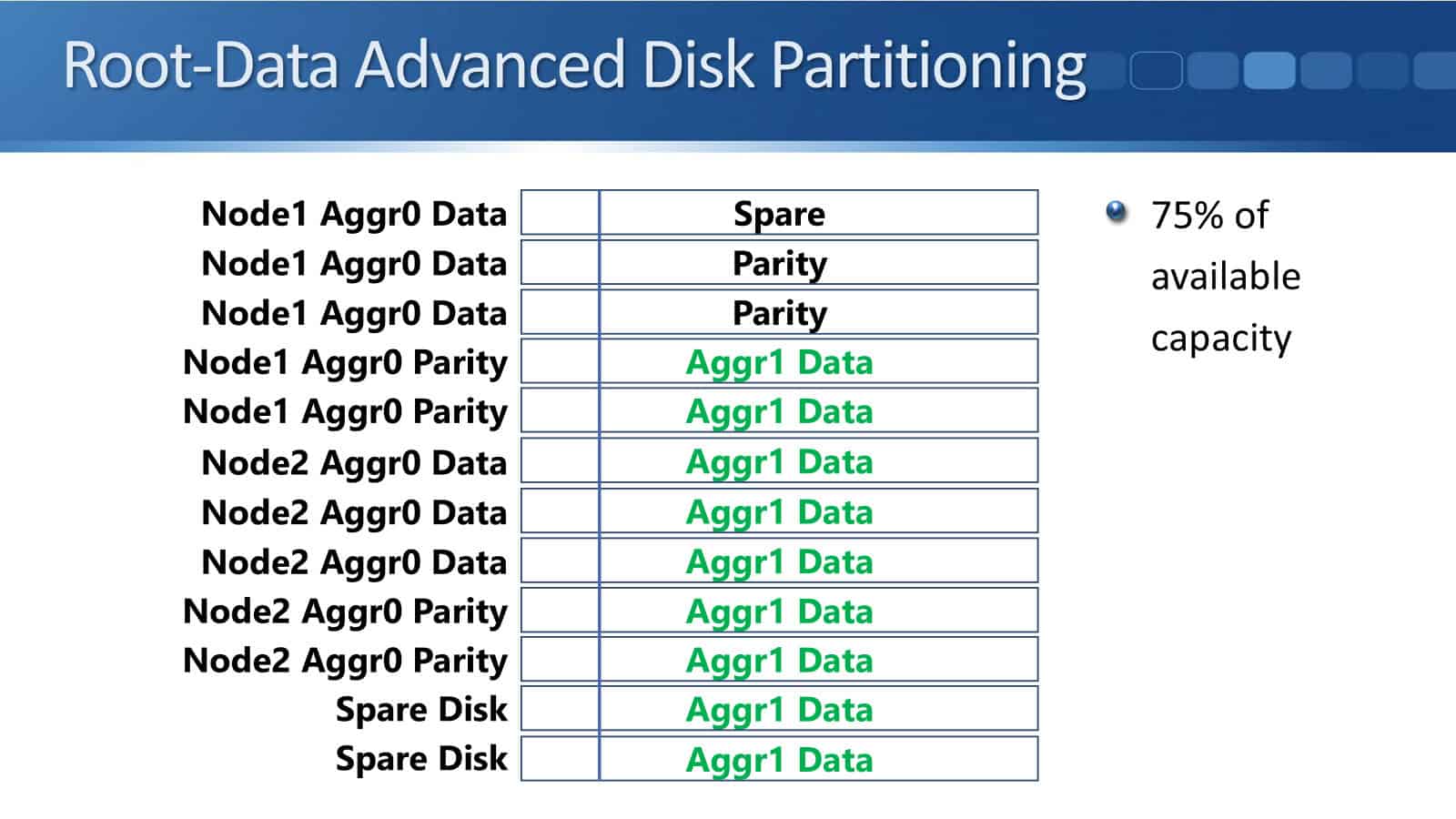
Then we've still got the large partition still available now, so what we do there is the first one is allocated as spare. Then we have two large partitions that are used for parity, and now all the rest of those large partitions are available for Aggr1 for our user data.
Before, we just had 17% usable capacity. Now, with ADP on the same system, we get up to 75% of the available capacity going to be used for our user data. That is much more efficient, a much better number for the users.
Root-Data-Data ADP in ONTAP 9
Root-Data ADP became available in ONTAP 8.3. In ONTAP 9.0, Root-Data-Data ADP is now available. With Root-Data, there’s the small root partition and the larger data partition.
With Root-Data-Data, there's a small root partition, and then there are two data partitions that are an equal size, and they're both larger than the root partition.
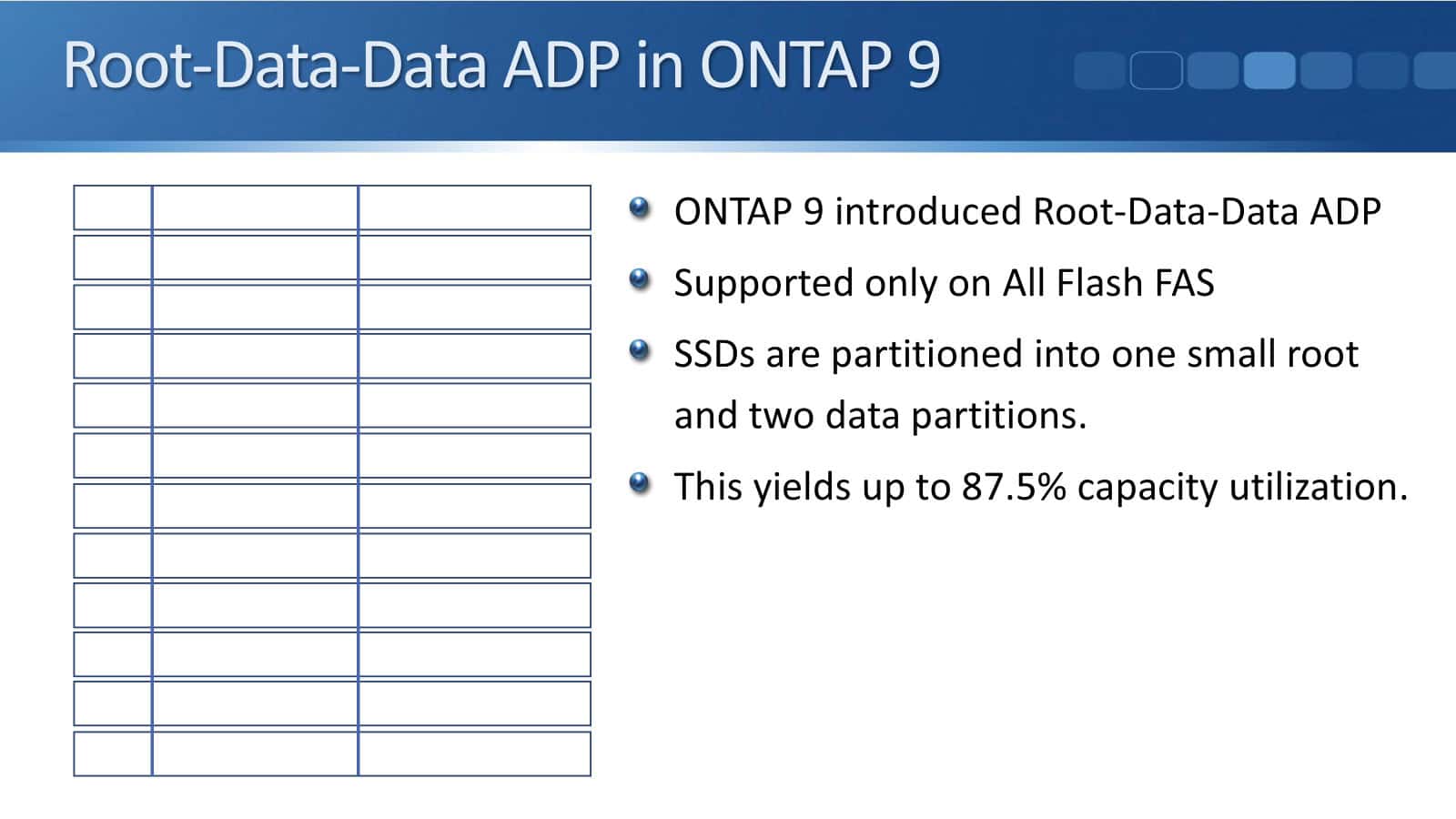
This is supported only on All Flash FAS, so it's not supported on the FAS system. Here, the SSDs are partitioned into one small root and two data partitions. It's SSDs because this is All Flash FAS, and this gets an even higher utilization again, which is up to 87.5% of the capacity.
Advanced Disk Partitioning
ADP is recommended on entry-level platforms, because on entry-level platforms you've got less disk space there, so you want to make the best use of the capacity as you can. On the higher-end systems with lots of external disk shells, you've got a lot more disks there. Out of the total space, the actual system information is taking a much smaller proportion of that, so it's not a big deal.
But on the entry-level platforms, if you weren't using ADP, that system information would be using too high a proportion of the available capacity, so ADP is recommended on the entry-level platforms, and it's also recommended on AFF, All Flash FAS. It's not supported if you're using MetroCluster.

New systems ship with ADP already configured, so it comes like that from the factory. This is either an on or off thing, so you never need to configure it on new systems now.
Systems running older versions of ONTAP before version 8.3 can be converted to ADP. You’re not going to have to do that now on any modern system. It's going to have ADP configured on it already anyway. But if for some reason you are working on an old system, you can convert it to ADP.
Additional Resources
Root-Data Partitioning: https://docs.netapp.com/us-en/ontap/concepts/root-data-partitioning-concept.html
How to migrate to Advanced Disk Partitioning (ADP)?: https://kb.netapp.com/on-prem/ontap/OHW/OHW-KBs/How_to_migrate_to_Advanced_Disk_Partitioning
What are the rules for Advanced Disk Partitioning?: https://kb.netapp.com/on-prem/ontap/Ontap_OS/OS-KBs/What_are_the_rules_for_Advanced_Disk_Partitioning
How to setup Advanced Disk Partitioning: https://kb.netapp.com/on-prem/ontap/OHW/OHW-KBs/How_to_setup_Advanced_Disk_Partitioning
Libby Teofilo

Text by Libby Teofilo, Technical Writer at www.flackbox.com
Libby’s passion for technology drives her to constantly learn and share her insights. When she’s not immersed in the tech world, she’s either lost in a good book with a cup of coffee or out exploring on her next adventure. Always curious, always inspired.